Re: Menu bar is not visible
Posted by Zagorvovo on
URL: http://piano-booster.139.s1.nabble.com/Menu-bar-is-not-visible-tp7572894p7572951.html
Dear Louis,
First, I really cannot express my delight for your remarkable Piano Booster!
It is exactly what I needed - simple, clear, no childish animated heroes onscreen and no constant fees you can't stop.
And the main thing is that you can easily move further from a newbie by changing MIDIs.
BUT!!!
I have the same problem as Hazukirio has - no menu bar, no translation, no hints at the bottom.
It works fine on a new PC with Win10 Intel I7 32 RAM etc, but I decided to dedicate one of my old PCs to Piano Booster and attach MIDI keyboard to it forever.
Аnd here the problems began.
The PC is Core2Duo 4 GB RAM Win7 Professional 64-bit NVIDIA GeForce 9800 GTX.
It was absolutely clean and empty before installing Piano Booster.
After insatallation it asked for C++ (reasonable), Piano Booster started, but with no menu and translation.
I've come through the way of samurai you suggested. The results are:
1. \AppData\Roaming\PianoBooster\Piano Booster.ini was deleted - NO EFFECT
2. A directory BoosterMusicBooks4 is present.
3. Shortcuts you suggested Hazukirio do nothing.
4. All 33 items (including subdirectories) are in place in Piano Booster directory. BUT THERE MUST BE 34 ITEMS - see below.
5. Both VMPK32 and VMPK64 are running well.
6. Files comparison with PB-windows-files.txt showed two missing files:
a) pianobooster-1.0.0-DEBUG.exe in root directory of Piano booster (thus they must be 34 in number)
b) one translation file - pianobooster_ru.qm (yes, I am Russian). Damn, why not any other file!!! I don't need the translation too much but it may point to the reason of misfunction.
6. pianobooster-1.exe was added and started. It has said only one thing - No QT platfofm plugin could be initialised. I forsee your question - is C:\Program Files (x86)\Piano Booster\plugins\platforms\qwidows.dll in place? Yes, it is. I belong to the generation that knows QT as QuickTime, so I wanted to install it, but I found that QT is somewhat a platform with a heap of licences. Don't know exactly what I need.
7. Copying VMPK files into Piano Booster directory made thw same result:
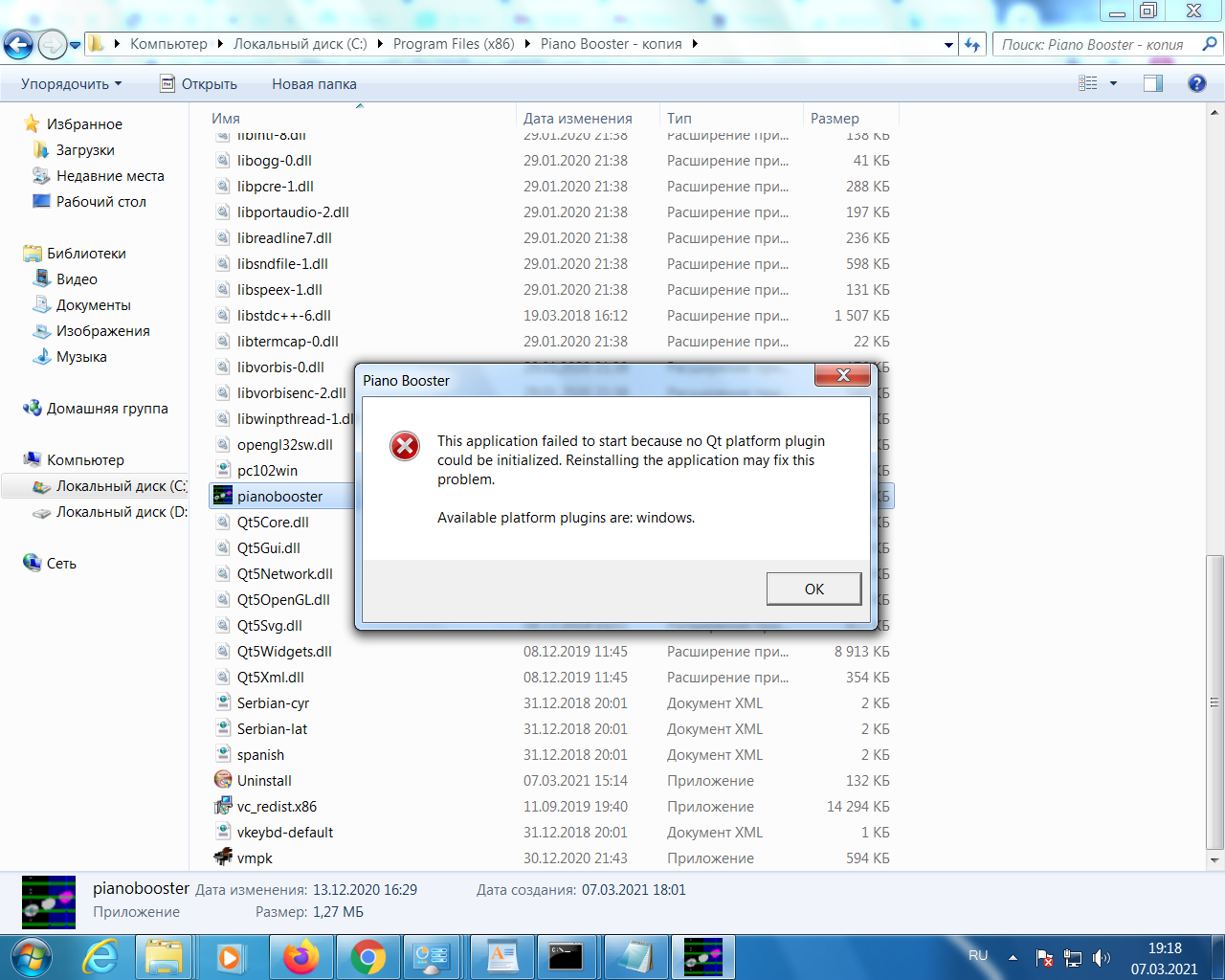
8. I've copied working directory Piano Booster from Win10 machine to Win7 one. Started without menu bar.
Finally, I have installed the previous version of Piano Master to Win7 PC and having fun now.
Latency does not bother. There are only two inconveniences - white crosses (time markers) sometimes do not appear, and there is no loop tick in old version.
BTW, it would be better (imho) if user could start playing the track by pressing any key on MIDI keyboard in idle state (after end or before beginning), without affecting the accuracy score. Certainly it must be a switchable option.
What to do next, Master?
Is there any hope?
Sincerely yours,
Zagorvovo
URL: http://piano-booster.139.s1.nabble.com/Menu-bar-is-not-visible-tp7572894p7572951.html
Dear Louis,
First, I really cannot express my delight for your remarkable Piano Booster!
It is exactly what I needed - simple, clear, no childish animated heroes onscreen and no constant fees you can't stop.
And the main thing is that you can easily move further from a newbie by changing MIDIs.
BUT!!!
I have the same problem as Hazukirio has - no menu bar, no translation, no hints at the bottom.
It works fine on a new PC with Win10 Intel I7 32 RAM etc, but I decided to dedicate one of my old PCs to Piano Booster and attach MIDI keyboard to it forever.
Аnd here the problems began.
The PC is Core2Duo 4 GB RAM Win7 Professional 64-bit NVIDIA GeForce 9800 GTX.
It was absolutely clean and empty before installing Piano Booster.
After insatallation it asked for C++ (reasonable), Piano Booster started, but with no menu and translation.
I've come through the way of samurai you suggested. The results are:
1. \AppData\Roaming\PianoBooster\Piano Booster.ini was deleted - NO EFFECT
2. A directory BoosterMusicBooks4 is present.
3. Shortcuts you suggested Hazukirio do nothing.
4. All 33 items (including subdirectories) are in place in Piano Booster directory. BUT THERE MUST BE 34 ITEMS - see below.
5. Both VMPK32 and VMPK64 are running well.
6. Files comparison with PB-windows-files.txt showed two missing files:
a) pianobooster-1.0.0-DEBUG.exe in root directory of Piano booster (thus they must be 34 in number)
b) one translation file - pianobooster_ru.qm (yes, I am Russian). Damn, why not any other file!!! I don't need the translation too much but it may point to the reason of misfunction.
6. pianobooster-1.exe was added and started. It has said only one thing - No QT platfofm plugin could be initialised. I forsee your question - is C:\Program Files (x86)\Piano Booster\plugins\platforms\qwidows.dll in place? Yes, it is. I belong to the generation that knows QT as QuickTime, so I wanted to install it, but I found that QT is somewhat a platform with a heap of licences. Don't know exactly what I need.
7. Copying VMPK files into Piano Booster directory made thw same result:
8. I've copied working directory Piano Booster from Win10 machine to Win7 one. Started without menu bar.
Finally, I have installed the previous version of Piano Master to Win7 PC and having fun now.
Latency does not bother. There are only two inconveniences - white crosses (time markers) sometimes do not appear, and there is no loop tick in old version.
BTW, it would be better (imho) if user could start playing the track by pressing any key on MIDI keyboard in idle state (after end or before beginning), without affecting the accuracy score. Certainly it must be a switchable option.
What to do next, Master?
Is there any hope?
Sincerely yours,
Zagorvovo
| Free forum by Nabble | Edit this page |